
Security in development is a crucial pillar of cybersecurity. It consists of integrating secure practices from the earliest stages of the design and development of applications, in order to prevent vulnerabilities and protect sensitive data. In the current context, where cyberattacks are increasingly sophisticated, understanding and implementing security measures in software development is essential.
These exercises will guide you through practical scenarios to identify and fix common vulnerabilities in code. You will learn to secure your applications against attacks such as SQL injections and XSS (Cross-Site Scripting) flaws. Each exercise is designed to familiarize you with specific techniques, giving you the knowledge needed to develop robust and secure applications.

Validation of user input
Objective :
Learn to validate and sanitize user input to prevent common vulnerabilities such as SQL injections, XSS flaws, and other attacks based on unsecured input.
Prerequisites:
- Basic knowledge of PHP and HTML.
- Local web server (such as LAMP, XAMPP or WAMP).
Instructions:
- Create a simple HTML form allowing the user to enter their name and email address.
- Process the data in PHP to prevent the inclusion of malicious characters.
Solution and explanationsSolution
Creating a form to enter names and emails.
html
<form method="post" action="">
Nom : <input type="text" name="nom"><br>
Email : <input type="email" name="email"><br>
<input type="submit" value="Envoyer">
</form>
Processing the data in PHP to prevent the inclusion of malicious characters.
<?php
if ($_SERVER["REQUEST_METHOD"] == "POST") {
$nom = $_POST['nom'];
$email = $_POST['email'];
// Validation et assainissement des données
$nom = trim($nom);
$nom = stripslashes($nom);
$nom = htmlspecialchars($nom);
$email = filter_var($email, FILTER_SANITIZE_EMAIL);
if (!filter_var($email, FILTER_VALIDATE_EMAIL)) {
echo "Adresse email invalide.";
} else {
echo "Nom : $nom<br>";
echo "Email : $email<br>";
}
}
?>
Explanations
Validation and sanitization of the data
trim($nom): Removes whitespace at the start and end of the string.stripslashes($nom) : Removes the backslashes ( \ ) added by some PHP functions to escape special characters.htmlspecialchars($nom): Converts special characters into HTML entities (for example, < becomes <), thereby preventing the execution of HTML or JavaScript code.
Email validation
filter_var($email, FILTER_SANITIZE_EMAIL): Removes invalid characters for an email address.filter_var($email, FILTER_VALIDATE_EMAIL) : Validates that the email is well formed.
Detailed solution and explanations
Removing spaces and unnecessary characters:$nom = trim($nom);
This function eliminates whitespace or other predefined characters (such as line breaks) at the start and end of the string.
Removing backslashes:$nom = stripslashes($nom);
stripslashes() removes the backslashes added to escape quotes in certain PHP configurations, thus protecting against some forms of injection.
Converting special characters:$nom = htmlspecialchars($nom);
htmlspecialchars() converts special characters into HTML entities to prevent XSS attacks. For example, < becomes <, > becomes >, and so on.
Sanitizing the email:$email = filter_var($email, FILTER_SANITIZE_EMAIL);
FILTER_SANITIZE_EMAIL removes all characters that are not allowed in an email address.
Validating the email:if (!filter_var($email, FILTER_VALIDATE_EMAIL)) {
echo "Adresse email invalide.";
}
FILTER_VALIDATE_EMAIL checks that the email address is well formed according to the email address standard. If the email is not valid, an error message is displayed.
Protection against SQL injection
Objective: Understand and implement security measures to prevent SQL injection attacks.
Instructions
- Create a simple database with a users table.
- Write an SQL query that is vulnerable to SQL injection.
- Modify the code to use prepared statements in order to prevent SQL injection.
Steps
1. Creating the database and the table:
- Use a DBMS (for example, MariaDB, MySQL or PostgreSQL) to create a database and a users table.
- Then insert at least one user into this table (for example, admin)
2. Vulnerable SQL query:
- Write an SQL query in a PHP file (for example, login.php) that is vulnerable to SQL injection.
- Open your browser and access the login.php file.
- Inject malicious SQL queries to see whether the application is vulnerable.
3. Using prepared statements:
- Modify the code to use prepared statements and prevent injection.
- Test the application again using the same SQL injection as before.
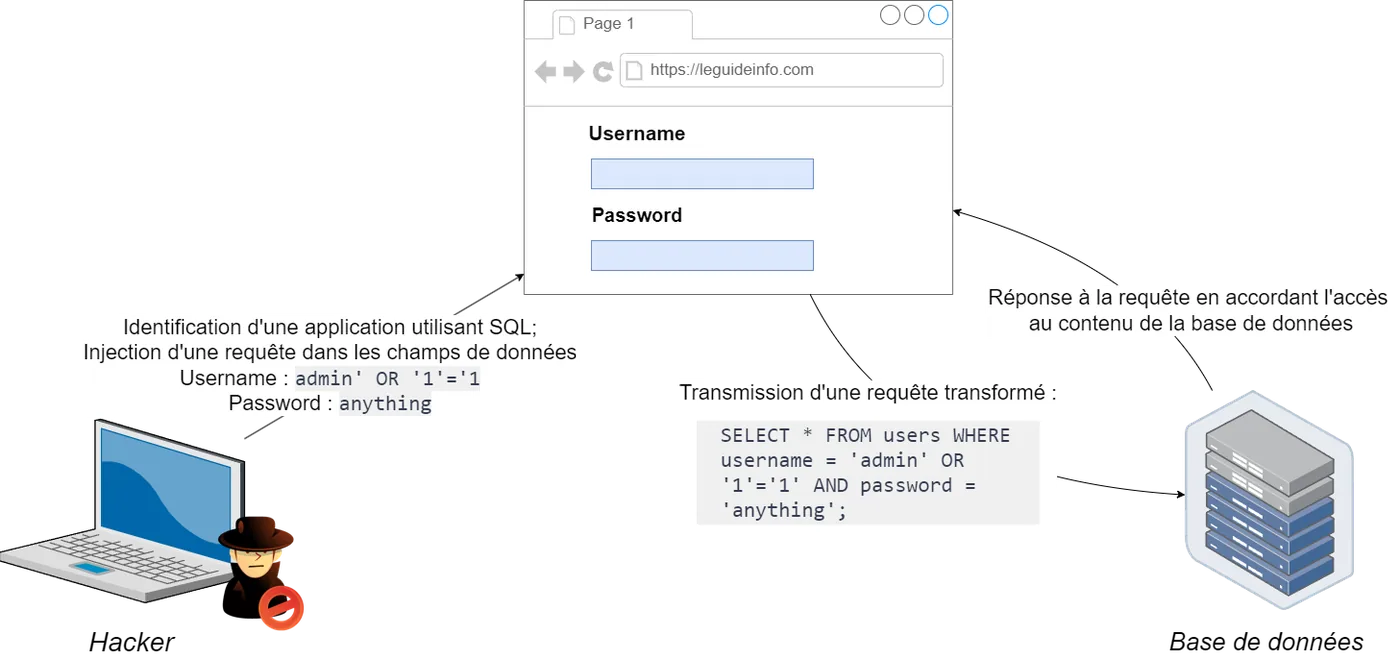
Solution and explanations1. Creating the database and the table
Solution for the SQL query to create the database and the table:
CREATE DATABASE security_test;
USE security_test;
CREATE TABLE users (
id INT AUTO_INCREMENT PRIMARY KEY,
username VARCHAR(50),
password VARCHAR(50)
);
Inserting data:
INSERT INTO users (username, password) VALUES ('admin', 'password123'), ('user1', 'pass1');
Explanations of the MySQL commands:
CREATE DATABASE security_test; : This command creates a new database named security_test.
USE security_test; : This command selects the security_test database so that the following commands are executed in this context.
CREATE TABLE users (id INT AUTO_INCREMENT PRIMARY KEY, username VARCHAR(50), password VARCHAR(50)); : This command creates a users table with three columns: id (auto-incremented primary key), username and password (both of type VARCHAR with a maximum length of 50 characters).
INSERT INTO users (username, password) VALUES ('admin', 'password123'), ('user1', 'pass1'); : This command inserts two records into the users table.
These steps make it possible to create a simple test environment for the SQL injection exercises.
2. Vulnerable SQL query
Contents of the login.php file:
<?php
$conn = new mysqli('localhost', 'root', '', 'security_test');
if ($conn->connect_error) {
die("Connection failed: " . $conn->connect_error);
}
if ($_SERVER["REQUEST_METHOD"] == "POST") {
$username = $_POST['username'];
$password = $_POST['password'];
$query = "SELECT * FROM users WHERE username = '$username' AND password = '$password'";
$result = $conn->query($query);
if ($result->num_rows > 0) {
echo "Login successful!";
} else {
echo "Invalid credentials.";
}
}
?>
<form method="post" action="">
Username: <input type="text" name="username">
Password: <input type="password" name="password">
<input type="submit" value="Login">
</form>
Explanation of the code:
Connecting to the database: new mysqli('localhost', 'root', '', 'security_test'); creates a connection to the security_test database on localhost with the root user and no password.
SQL query: $query = "SELECT * FROM users WHERE username = '$username' AND password = '$password'"; dynamically builds an SQL query based on the user's input.
Checking the results: if ($result->num_rows > 0) checks whether the query returned any rows, indicating a successful login.
Vulnerability:
By injecting a malicious SQL query into the input fields, for example, admin' OR '1'='1 as the username and anything as the password, the attacker can bypass authentication.
Details of the SQL injection
Example of an attack
Username: admin' OR '1'='1Password: anything
Construction of the SQL query:
When these values are sent through the web form, the vulnerable PHP code builds the following SQL query:
SELECT * FROM users WHERE username = 'admin' OR '1'='1' AND password = 'anything';
To understand better, let us break down this query:
WHERE clause:username = 'admin' : Checks whether the username is admin.OR '1'='1' : Always true because '1' is equal to '1'.
AND password = 'anything' : Checks whether the password is anything.
Evaluation of the WHERE clause:
In SQL, the AND and OR operators follow a precise logic:
A OR B is true if either condition A or B is true.A AND B is true if both conditions A and B are true.
In this case:The condition username = 'admin' may be true or false.The condition '1'='1' is always true.The condition password = 'anything' may be true or false.The presence of OR '1'='1' means that the entire clause username = 'admin' OR '1'='1' is always true, regardless of what the username field contains.
Result of the query:
Since OR '1'='1' is always true, the query can be reduced to:
SELECT * FROM users WHERE TRUE AND password = 'anything';Which is equivalent to:
SELECT * FROM users WHERE password = 'anything';
However, the AND with an always-true condition and an unimportant condition (password = 'anything') means that MySQL will return the first row of the table if a row matches the supplied password, or even all rows if one of the conditions is false. But since OR '1'='1' is always true, the query returns all users.
Impact:The query returns a row from the users table, which makes the PHP script believe that authentication succeeded.
The attacker is thus successfully authenticated without knowing the real password.Using prepared statements
Modification of the login.php file:<?php
$conn = new mysqli('localhost', 'root', '', 'security_test');
if ($conn->connect_error) {
die("Connection failed: " . $conn->connect_error);
}
if ($_SERVER["REQUEST_METHOD"] == "POST") {
$username = $_POST['username'];
$password = $_POST['password'];
$stmt = $conn->prepare("SELECT * FROM users WHERE username = ? AND password = ?");
$stmt->bind_param("ss", $username, $password);
$stmt->execute();
$result = $stmt->get_result();
if ($result->num_rows > 0) {
echo "Login successful!";
} else {
echo "Invalid credentials.";
}
}
?>
<form method="post" action="">
Username: <input type="text" name="username">
Password: <input type="password" name="password">
<input type="submit" value="Login">
</form>
Explanation of the code:
1. The mysqli_stmt class
The mysqli_stmt class in PHP represents a prepared SQL statement. It makes it possible to execute SQL queries securely, avoiding SQL injections. The class is used together with a mysqli object (which represents a connection to a database).
2. Creating a prepared statement
Line of code:
$stmt = $conn->prepare("SELECT * FROM users WHERE username = ? AND password = ?");
$conn->prepare() is a method of the mysqli object that takes as a parameter a string containing the SQL query with question marks ? as placeholders for the parameters.
This method returns a mysqli_stmt object representing the prepared statement.The question marks ? indicate the locations where the variable values will be inserted securely.
3. Binding the parameters
Line of code:
$stmt->bind_param("ss", $username, $password);
bind_param() is a method of the mysqli_stmt object used to bind the PHP variables to the ? placeholders in the prepared statement.
The first argument "ss" is a string specifying the types of the parameters:"s" for string"i" for integer"d" for double (floating-point number)"b" for blob (binary data)
In this case, "ss" indicates that the two parameters are strings.
The following arguments are the variables to bind: $username and $password.
4. Executing the query
Line of code:
$stmt->execute();
execute() is a method of the mysqli_stmt object that executes the prepared statement with the bound parameter values.When execute() is called, the SQL query is sent to the database server with the variable values inserted in place of the placeholders.
5. Retrieving the results
Line of code:
$result = $stmt->get_result();
get_result() is a method of the mysqli_stmt object that returns a mysqli_result object representing the results of the query.This object can be used to access the data returned by the SQL query.
The importance of prepared statements
Using prepared statements prevents such injections because the user's input is not inserted directly into the SQL query. Prepared statements treat the input as raw data, separate from the SQL commands.
Protection against XSS flaws
Objective : Learn to identify and prevent XSS flaws by understanding how an attacker can inject malicious scripts into a web application.
Prerequisites :
- Basic knowledge of PHP and HTML.
- Local web server (such as XAMPP or WAMP).
Steps:
1. Creating a vulnerable web application
Create a simple HTML form allowing the user to submit a comment, then display this comment on the same page without validation.
<?php
if ($_SERVER["REQUEST_METHOD"] == "POST") {
    $comment = $_POST['comment'];
}
?>
<!DOCTYPE html>
<html lang="en">
<head>
    <meta charset="UTF-8">
    <title>Commentaires</title>
</head>
<body>
    <form method="post" action="">
        Commentaire: <input type="text" name="comment">
        <input type="submit" value="Soumettre">
    </form>

    <h2>Commentaires:</h2>
    <p><?php echo $comment; ?></p>
</body>
</html>
2. Injecting a malicious script:
Submit the form with a malicious script as the comment:
<script>alert('XSS Attack!');</script>
When the comment is displayed, the script will be executed, showing an alert with the message "XSS Attack!".
3. Understanding the behavior of the request:
The form sends the comment data through a POST request.
The value of $_POST['comment'] is displayed directly without validation, which allows the injection of JavaScript code.
4. Preventing the XSS flaw
Modify the PHP script to use htmlspecialchars() in order to convert special characters into HTML entities, thereby preventing the execution of the script.
<?php
if ($_SERVER["REQUEST_METHOD"] == "POST") {
    $comment = htmlspecialchars($_POST['comment'], ENT_QUOTES, 'UTF-8');
}
?>
<!DOCTYPE html>
<html lang="en">
<head>
    <meta charset="UTF-8">
    <title>Commentaires</title>
</head>
<body>
    <form method="post" action="">
        Commentaire: <input type="text" name="comment">
        <input type="submit" value="Soumettre">
    </form>
    <h2>Commentaires:</h2>
    <p><?php echo $comment; ?></p>
</body>
</html>
5. Checking the protection
Submit the form again with the malicious script:
<script>alert('XSS Attack!');</script>This time, the script will not be executed, and the comment will literally display <script>alert('XSS Attack!');</script>.