
Cracking passwords is an important skill to learn if you do penetration testing. That is why we are going to look together at how to crack hashes on Linux using Hashcat.
A refresher on hashing
Why use Hashcat
How to install Hashcat on Linux
How to decrypt a password through a dictionary attack
Cracking hashes from the /etc/shadow file
Hashcat is a powerful and versatile tool that brute-forces credentials stored using known hashes by carrying out various attack modes. This article will guide you in getting started with this password-cracking utility, used by pentesters, system administrators, spies, or hackers to find passwords.
A refresher on hashing
Hashing is a one-way mathematical function or a unique identifier that returns a fixed-length output, regardless of the size/length of the input. It is therefore an irreversible process that does not require a key, as encryption does, to decrypt the hash value.
The most common purpose of hashing is to ensure data integrity against tampering during data transmission. The properties of hashing are as follows:
- Fast computation
- Good algorithms avoid the same output for different inputs
- Small changes in the input significantly influence the output hash value
Why use Hashcat?
Hashcat is a multithreaded utility that lets you configure the number of threads and limit execution based on priority. It supports more than 300 hash algorithms such as MD4, MD5, SHA1, SHA512, bcrypt, HMAC-SHA512, NTLM, MySQL, WHIRLPOOL, among others. It is available for all types of operating systems, including Windows, Linux, Unix, and BSD.
Hashcat offers several attack modes to crack the hash
Here is an explanation of some of the attacks that Hashcat uses to decrypt hashed passwords:
- Brute-force attack: A brute-force attack uses all possible combinations of characters to determine the exact password. However, it has a limitation on the maximum password length and the number of characters. In addition, an advanced level of brute-force attack can also optimize the time by making complexity assumptions. For example, an advanced brute-force technique can assume that the first character is more likely to be uppercase and that digits are more likely to appear at the end of a password, and so on.
- Dictionary attack: A dictionary attack uses a precomputed list of passwords based on information gathered around the target or on a pattern observed among users. As a result, it takes some of the most commonly used passwords and adds a few permutations to them to increase the scope.
- Hybrid attack: The hybrid is a combination of the attacks described above, since it checks whether the password is "crackable" through a dictionary attack and moves on to the brute-force technique if that is not possible.
How to install hashcat on Linux
Hashcat is available by default in Kali Linux. To install it on Ubuntu and Debian:
sudo apt update
sudo apt install hashcat
After installation, use the help command to display the available options:
hashcat --helpHow to decrypt a password through a dictionary attack
1. Create a dictionary with MD5 hashes
To begin this demonstration, we are going to create several hash entries containing several passwords.
In detail, they will then be output to a file called "hashes_list.txt". Each command must be run in the terminal, as shown below:
echo -n "password" | md5sum | tr -d " -">> hashes_list.txt
echo -n "HELLO" | md5sum | tr -d " -">> hashes_list.txt
echo -n "MYSECRET" | md5sum | tr -d " -">> hashes_list.txt
echo -n "Test1234" | md5sum | tr -d " -">> hashes_list.txt
echo -n "P455w0rd" | md5sum | tr -d " -">> hashes_list.txt
echo -n "GuessMe" | md5sum | tr -d " -">> hashes_list.txt
echo -n "S3CuReP455Word" | md5sum | tr -d " -">> hashes_list.txt
The -n option removes the newline added at the end of "Password". This is important because we do not want the newline characters to be hashed along with our password. The « tr –d ' -' » part removes all characters that are a space or a hyphen from the output.
2. Check the password hashes
To do this, we need to type the following command line in the terminal:
cat hashes_list.txtHere is the output below:
root@kali:# cat hashes_list.txt
dc647eb65e6711e155375218212b3964
eb61eead90e3b899c6bcbe27ac581660
958152288f2d2303ae045cffc43a02cd
2c9341ca4cf3d87b9e4eb905d6a3ec45
75b71aa6842e450f12aca00fdf54c51d
031cbcccd3ba6bd4d1556330995b8d08
b5af0b804ff7238bce48adef1e0c213f
3. Start Hashcat in Kali Linux
Hashcat can be started on the Kali console with the following command line:
hashcat -h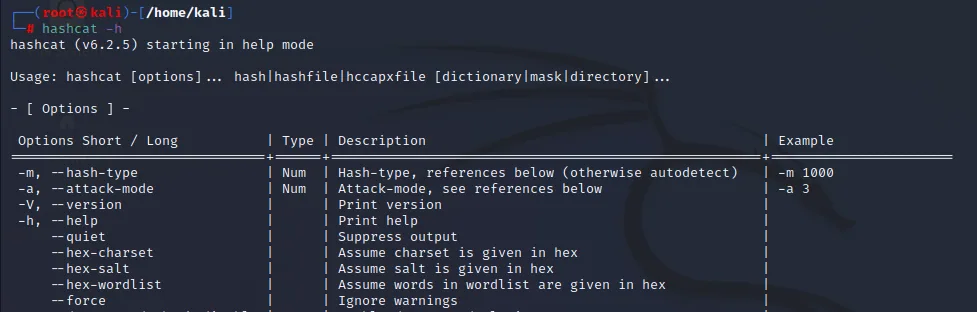
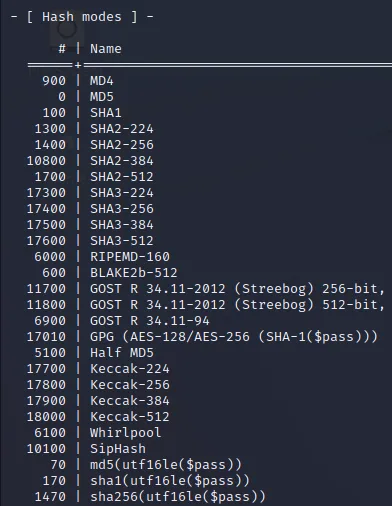
Some of the most important hashcat options are -m (the hash type) and -a (attack mode). In general, we need to use both options in most password-cracking attempts when using Hashcat.
Hashcat also has rules specially designed to be used on a wordlist file. The character list can be customized to crack the password(s).
Hashcat provides many options for the password hashes that can be cracked. This can be a little lower down after the command.
4. Choose the word dictionary
Kali Linux contains many built-in wordlists. To find them, use the following command line: (formerly locate wordlists)
wordlists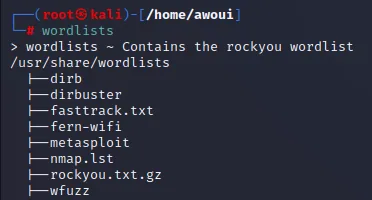
We will use the «rockyou» wordlist at the following location: /usr/share/wordlists/rockyou.txt.gz
The .gz extension indicates that the list is compressed. Let us enter the gzip command to decompress it, like this:
sudo gzip -d /usr/share/wordlists/rockyou.txt.gz5. Crack the hashes
In the last step, we can now start cracking the hashes contained in the hashes_list.txt file. We will use the following command line, as shown below:
hashcat -m 0 -a 0 -o cracked.txt hashes_list.txt /usr/share/wordlists/rockyou.txtThe hash algorithm is selected with the -m option; the 0 refers to md5
The results will be saved in the cracked.txt file specified with the -o option
The -a option is used to set the type of attack used.
Cracking hashes from the /etc/shadow file on Linux
The /etc/shadow file stores the hashed values of all users' passwords on Linux. It is a critical file with strict access permissions; it is and must only be accessible by the root account.
Therefore, if you come across an /etc/shadow file that is readable through any normal user account, you can obtain the hash value of the root account and decrypt the password hash using the Hashcat utility.
For demonstration purposes, we are going to switch to the root account and create a new user account alice to understand how Hashcat works:
sudo su
useradd -c "Bob" bob
Let us create a password using the passwd command:
passwd aliceLet us check the hashed password value in the /etc/shadow file using the cut command, which will make it possible to directly extract the field we are looking for:
tail /etc/shadow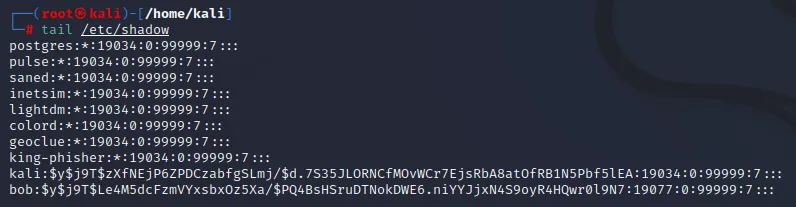
The hash in the output above starts from " bob: ".
The $y$ value indicates that this is yescrypt, a recent hashing scheme used by default in Debian 11, Fedora 35+, and Kali Linux 2021.1+. It is supported by Fedora 29+ and Ubuntu 20.04+, and is also recommended for new passwords.
yescrypt is not available in Hashcat at the moment, so you will have to try with another hash algorithm or another Linux machine to carry out your test.
Historically, the use of SHA-512
Below you will find an example of a hash with SHA-512, which is widely used and was moreover the default method on Kali Linux before yescrypt.
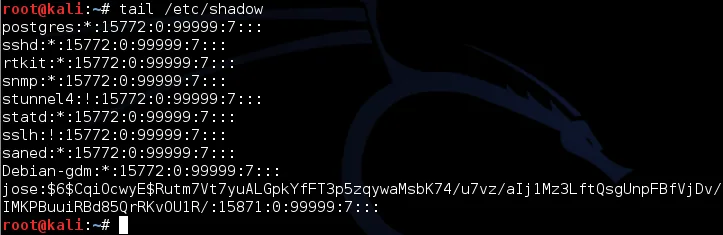
The $6$ value indicates a type 6 password hash (SHA-512, multiple rounds). The characters after $6$, up to the next $, are the SALT.
In the example, the SALT is CqiOcwyE
You can go to the hashcat website to identify the type of hash function and the associated reference value. The SHA512 hash mode is generally identified by the term $6$ and has a reference value of 1800.