
Microsoft is known for the excessive collection of user data through its telemetry program, which gathers information about the use of the Windows operating system and sends it to Microsoft. Some people have voiced concern about the intrusive nature of this data collection.

The following steps show how to disable telemetry from the registry :

1. Press the "Windows + R" keys to open the "Run" dialog box.
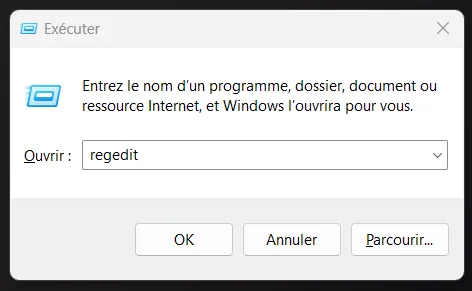
2. Type "regedit" and press Enter to open the Registry Editor.
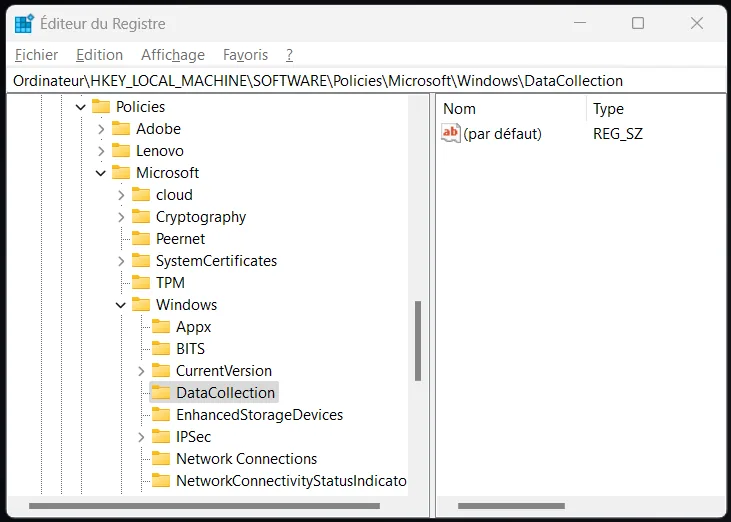
3. Go to the following key: HKEY_LOCAL_MACHINE\SOFTWARE\Policies\Microsoft\Windows\DataCollection
4. If the "DataCollection" key does not exist, create it by right-clicking on "Windows", then selecting "New" and "Key". Name the key "DataCollection".
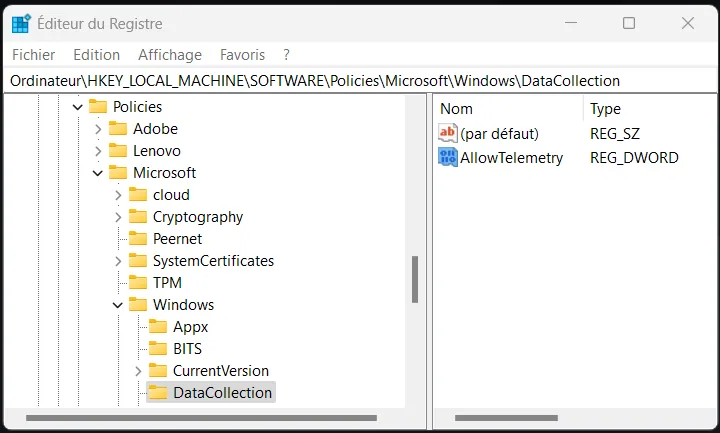
5. In the "DataCollection" key, create a new 32-bit DWORD value named "AllowTelemetry" if it does not already exist.
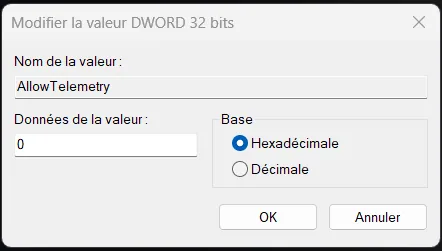
Double-click on "AllowTelemetry" and set its value to 0 to disable telemetry completely.
If you simply want to reduce the amount of data collected, you can set the value to a number between 1 and 3, depending on the level you want.
Note that disabling telemetry may have a slight impact on the quality and reliability of the operating system. Updates and fixes may be less effective.