
RAID (Redundant Array of Independent Disks; formerly Redundant Array of Inexpensive Disks) is a way of storing data in different places across several hard drives in order to protect it in the event of a drive failure or to improve its transfer rates. However, not all RAID levels provide redundancy.
History
RAID stands for "redundant array of independent disks". This system was invented in 1987 by three researchers at the University of California, Berkeley, with the aim of being able to use disks of low capacity, and therefore inexpensive (Inexpensive), in such a way that they were seen as a single disk. In this way, RAID can be described as the opposite of partitioning: in one case, you create several logical units from a single disk, in the other, you create a single logical unit from several physical disks.
A RAID system organizes data across several hard drives and uses an error-correction process in order to ensure the reliability of the archives. With the evolution of hard drive capacity, and therefore of the amount of data stored, reliability is increasingly a key element. In 1998, that is to say at the origin of the RAID system, there were 5 RAID levels, numbered from 1 to 5, corresponding to the different levels of reliability and performance of a system. Since then, other types of RAID have appeared. They are either the evolution of already existing RAID, or a combination of basic RAID.
Why RAID?
The RAID system was developed to:
• Increase capacity: the RAID system makes it possible to put hard drives end to end, which makes it possible to increase the size of the volume.
• Improve performance: Data is written across several disks at once. This way, each of the disks only has part of the data to write.
• Provide fault tolerance: Some RAID configurations make it possible to guard against the failure of a disk. This feature is very important, because otherwise, the failure of just one of the disks in a RAID array leads to the loss of the data of all the disks. This is moreover what happens at the RAID 0 level.
The main types of RAID
RAID 0:
This configuration involves striping, but no data redundancy. It offers the best performance, but no fault tolerance.
RAID 0 increases performance and makes it possible to reach a very high read and write throughput. The capacity of all the disks in the array is also combined. Thus, 2 hard drives of 2 TB in RAID 0 will be seen as a single disk of 4 TB by the operating system.

RAID 1:
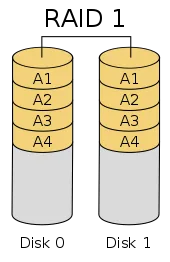
Also called disk mirroring, this configuration is made up of at least two disks duplicating the data storage. The content of one disk is copied entirely onto the second, which ensures a complete copy of its data in the event of a failure of the first disk.
Read performance is improved since both disks can be read at the same time. Write performance is the same as for storage on a single disk.
RAID 5:
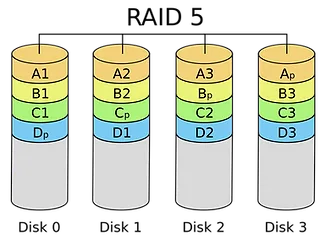
RAID 5 is designed on at least three hard drives. This system is the most used RAID system because it combines the simultaneous use of the disks, thus benefiting from improved read / write performance, and fault tolerance. This parity system makes it possible to prevent the failure of one of the hard drives present. The total capacity of this type of RAID is equal to the total minus the capacity of one disk (due to parity).
If we count 1 TB per disk
Formula for calculating the actually usable capacity: N° Disk -1
Example: 4 Disks -1 = 3 = 3TB
RAID 6:
RAID 6 for its part is on at least four disks. It is an evolution of RAID 5 but it relies on another type of distribution because it benefits from doubled parity. Thanks to the latter this system can make use of all the disks (and therefore obtain better read / write performance) and at the same time have tolerance to the failure of two hard drives.

If we count 1 TB per disk
Formula for calculating the actually usable capacity: N° Disk -2
Example: 5 Disks -2 = 3 = 3TB
Nested RAID levels:
Some RAID levels are called nested RAID because they are based on a combination of RAID levels. Here are some examples of nested RAID levels.
RAID 10 (RAID 1 + 0): Combining RAID 1 and RAID 0, this level is often called RAID 10, which offers superior performance to RAID 1, but at a much higher cost. In RAID 1 + 0, the data is mirrored and the mirrors are striped.
