
- What is SNMP?
- How does SNMP work?
- The architecture of SNMP
What is SNMP?
SNMP stands for "Simple Network Management Protocol". It is an application layer protocol included in the Internet protocol suite (a set of the most commonly used communication protocols).
SNMP was born in the 1980s, at a time when organizational networks were growing both in size and in complexity. Today it is one of the most widely accepted protocols for network monitoring. Here is a short summary of how SNMP works and why it matters to network professionals.
SNMP is made up of three key components: managed devices, agents, and network management systems (NMS). SNMP monitoring is useful for anyone responsible for servers and network devices such as hosts, routers, switches and even hubs. It allows you, for example, to keep an eye on network and bandwidth usage and to track important issues such as availability and traffic levels.
How does SNMP work?
All day long, traffic goes down and moves across your network as users perform transfers, browse, carry out downloads, and so on. SNMP communicates with your network to find information related to this network device activity: for example, the bytes, packets and errors transmitted and received on a router, the connection speed between devices, or the number of hits a web server receives.
SNMP works by sending messages, called protocol data units (PDU), to the devices on your network that "speak" SNMP. These messages are called SNMP Get-Requests. Using these requests, network administrators can track practically any data value they specify. All the information SNMP tracks can be supplied to the equipment that requests it. That equipment can display or store the data, according to the administrator's preferences.
The architecture of SNMP
The devices that can be managed, such as routers, switches, Wi-Fi, servers (Windows and others), desktop computers, laptops, printers, UPS units, and so on, include agent software that must be enabled and configured, or simply configured correctly, in order to be queried by the manager (NMS).
In order to monitor network activity effectively, SNMP relies on an architecture made up of the following elements:
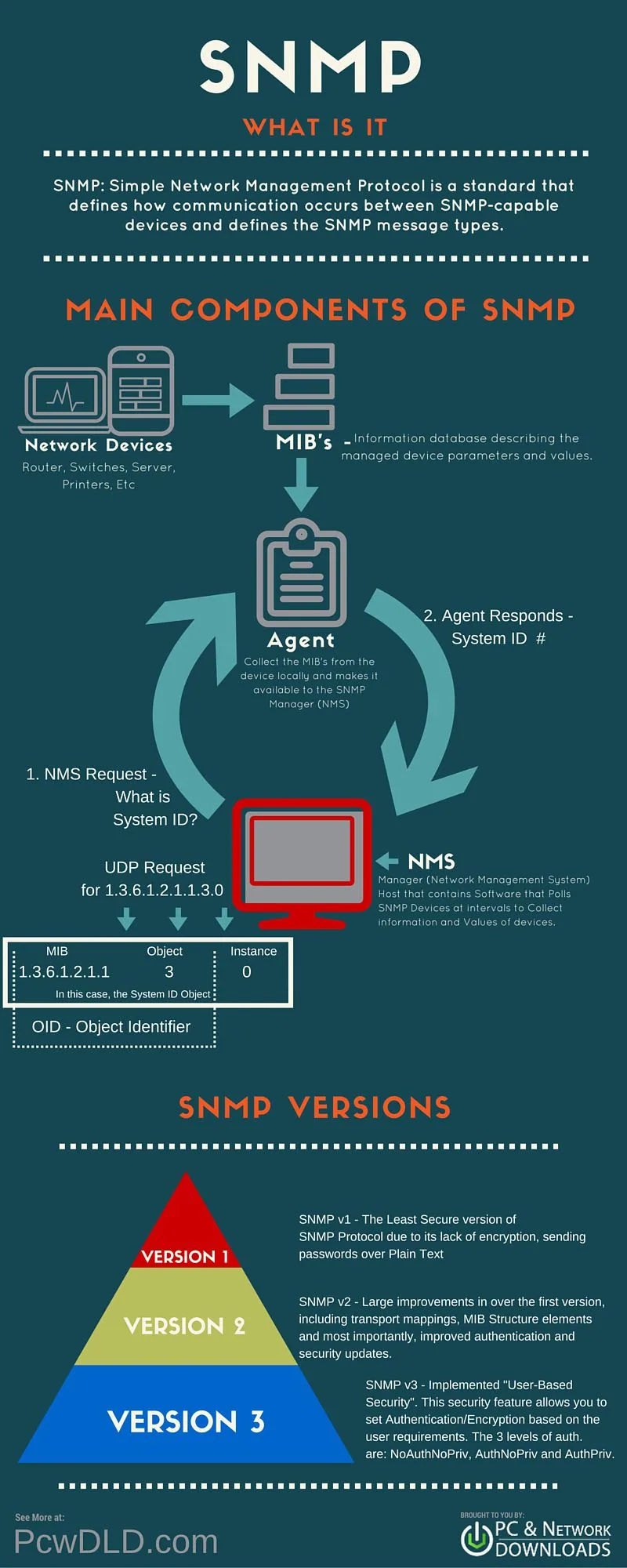
Manager (NMS)
The Manager component is simply software installed on a machine (which, when combined, is called the network management system) that queries the devices on your network at the frequency you specify.
The manager has the appropriate credentials to access the information stored by the agents (which is explained in the next section), then compiles it into a readable format for the network engineer or administrator, so as to monitor or diagnose problems or bottlenecks.
Some NMS software suites are more complex than others, allowing you to configure email or SMS messages to alert you to faulty devices on your network, while others simply query devices for more basic information.
Agents
The SNMP agent is software supplied with the network device (router, switch, server, Wi-Fi, and so on) that, when enabled and configured, does all the heavy lifting for the manager, compiling and storing all the data of its given device in a database (MIB).
This database is properly structured to allow the Manager software to query the information easily, and even to send information to the Manager if an error has occurred.
With SNMP monitoring, the monitoring software generally sends small data packets to the target equipment in order to ask it for various pieces of information. This in turn triggers response packets from the monitored devices to the SNMP manager.
SNMP port numbers
The manager software from the previous section queries the agents at regular intervals on UDP port 161.
SNMP traps, which you will see shortly, allow an agent to send information about the system and the device to the manager through UDP port 162.
Although UDP is the common protocol used by SNMP, TCP can also be used.
MIB
In short, MIB files are the set of questions that an SNMP manager can ask the agent.
The agent collects this data locally and stores it, as defined in the MIB. The SNMP manager must therefore be aware of these standard and private questions for each type of agent.
Agents, as explained above, maintain an organized database of parameters and other information.
The NMS (network management system) queries / asks the agent of a device, which then shares its organized information from the database with the NMS, which then translates it into alerts, reports, graphs and more.
The database that the agent shares between the agent is called the management information base, or MIB.
MIBs contain a set of values, both statistical and control, that are defined by the network device. On many occasions, extensions to the standard values are defined through a private MIB by the various networked device vendors.
To simplify MIBs, think of them like this: MIB files are the set of questions that a manager is allowed to ask the agent.
The agent simply gathers the answers to these questions, stores them locally, and serves them to the NMS on request.
A simplified example of how the MIB works: The NMS will ask the network device a question, in this case, what is the answer to question 2?
The agent of the managed network devices then replies with the answer to question 2.
SNMP traps
"Traps" are used when the device has to alert the network management software of an event without being queried.
Traps make sure that the NMS obtains information if a certain event occurs on the device that has to be recorded, without being queried by the NMS beforehand.
Managed network devices will have Trap MIBs with predefined conditions built in.
It is crucial that the network management system has these MIBs compiled in order to receive the traps sent by the given device or devices.
MIBs are numbers that identify certain characteristics or values of a device, but if the network management system does not have a certain MIB that the network device Trap sends, there is no way to interpret what the MIB is and it will not record the event.
The advantage is that devices automatically send messages to the SNMP server monitoring software in the event of crucial incidents, without having been asked to do so beforehand.
SNMP authentication traps
An authentication trap is sent when the SNMP agent receives a request with a community name that it does not recognize.
Traps are useful for finding out whether someone has broken into your system, although these days it is better to detect the software packages and discover the community name that way.
SNMP community string
The "SNMP community string" is like a user ID or a password that gives access to the statistics of a router or another device.
The monitoring server sends the community string with every SNMP request.
- If the community string is correct, the device replies with the requested information.
- If the community string is incorrect, the device simply rejects the request and does not reply.
Note: SNMP community strings are used only by devices supporting the SNMPv1 and SNMPv2c protocols. SNMPv3 uses user name / password authentication, together with an encryption key.
By convention, most SNMPv1-v2c equipment ships from the factory with a read-only community string set to " public ". It is common practice for network managers to change all community strings to custom values in the device configuration.